An employee leaves: what happens to their OneDrive, shares and access?
Key takeaways
- Blocking sign-in triggers nothing else: the OneDrive, the licence, group ownership and sharing links all stay in place until the account is deleted.
- Once the account is deleted, the OneDrive is kept for 30 days by default (configurable from 30 to 3,650 days), then sits 93 days in the recycle bin before it is gone.
- Groups and teams where the leaver was the only owner become ownerless, and the guests they invited stay in your tenant.
- Microsoft does not document that sharing links are revoked when their creator is deleted, so treat them as live until you have checked.
- The useful question can be counted, and it must be counted before the account is deleted: what did this person own, and what did they share?
Someone left three months ago. Their account is blocked, their mail goes to their manager, and the case feels closed. Then Microsoft 365 storage keeps climbing for no obvious reason, a customer asks why a link to one of your folders still opens, or an ISO 27001 auditor asks for evidence that the leaver's access was removed.
A leaver in Microsoft 365 is not an event, it is a timeline. This guide sets out what Microsoft actually documents, flags what it does not, and ends with an offboarding procedure in the order you would run it.
Blocking is not deleting #
Plenty of offboarding procedures stop at block sign-in. That is a halfway state:
- Blocking can take up to 24 hours. To cut access immediately, reset the password and revoke sessions (
revokeSignInSessionsinvalidates the user's refresh tokens within a few minutes). - Blocking does not remove the licence. They are separate steps, and an unassigned licence is still billed until you reduce the subscription.
- Blocking does not start OneDrive clean-up. Neither blocking sign-in nor removing the licence does: only deleting the account in Entra ID starts it.
A blocked account therefore keeps its OneDrive, its groups, its links and the apps it consented to. Remove the licence without deleting the account and the OneDrive becomes an "unlicensed" account: read-only after 60 days, archived after 93 days, and since 1 July 2026 subject to a cumulative 365-day non-payment clock after which it can be deleted. This is often where the storage growth nobody can explain is hiding.
Once deleted, the account stays soft-deleted in Entra ID for 30 days and can be restored with its properties and licences. After that, permanent deletion starts and cannot be stopped.
OneDrive: the real timeline #
Everything starts when the account is deleted. The sequence Microsoft documents:
| When | What happens |
|---|---|
| Day 0: account deleted | The OneDrive is marked for deletion. The manager (the manager attribute in Entra ID) gets access and an email. If no manager is set, the secondary owner configured in the SharePoint admin center gets them instead |
| Day 0 to day 30 | The user account can be restored in Entra ID |
| 7 days before retention ends | A second email reminds the manager or secondary owner that the OneDrive will be deleted in seven days |
| End of retention | 30 days by default, configurable from 30 to 3,650 days in the SharePoint admin center (Settings, Retention). The OneDrive moves to the site collection recycle bin |
| 93 days in the recycle bin | Shared content is no longer accessible. Restore is possible with PowerShell only. After that, the OneDrive is gone |
Three things procedures tend to miss:
- No manager and no secondary owner: the documentation describes no other recipient. Check one or the other before you delete the account.
- The clock starts at account deletion. A manager on three weeks' leave has already used most of the default window.
- Retention policies and eDiscovery holds take precedence: an eDiscovery hold blocks deletion until it is released.
The mailbox: shared or inactive #
Two options, with different prerequisites:
- Shared mailbox. Existing mail and calendar are kept and several people can access them. No licence is needed while the mailbox is under 50 GB. The catch: do not delete the account, it anchors the shared mailbox or the forwarding.
- Inactive mailbox. Content is kept for the retention period you set, and the Exchange licence is freed when the account is deleted. The hard requirement: a retention policy or hold must be on the mailbox before the account is deleted, and the mailbox must be licensed for it. Without a hold, the mailbox is simply deleted after 30 days.
Does someone need to keep answering that mail, or do you only need to keep it? If it is the second, check your licensing before the last day, not after.
What they owned, what they opened #
Sites, teams and Microsoft 365 groups #
SharePoint sites, Teams teams and Microsoft 365 groups the leaver owned keep existing. If they were the only owner, the group becomes ownerless when their account is deleted. Microsoft has a policy for this in the Microsoft 365 admin center (Settings, Org settings, Microsoft 365 Groups): "When there's no owner, email and ask active group members to become an owner". It emails active members weekly, up to two can accept, and if nobody accepts by the end of the period it takes no further action. It needs an eligible licence (Business Premium, E3 or E5, for example).
Sharing links #
This is the least documented part. What Microsoft does say:
- "Anyone" links need no authentication, and their use cannot be audited.
- For the leaver's own OneDrive, shared content becomes inaccessible when the OneDrive moves to the recycle bin at the end of retention. Nothing says links stop working before that, let alone while the account is only blocked.
- For files they shared from SharePoint sites or teams, the documentation does not say what happens to a link when its creator is deleted. The files belong to the site, not to the person.
So do not assume that deleting the account closes their shares. Check the links this person created and revoke the ones that no longer have a reason to exist.
Guests #
A guest is a user object in your directory: it stays after the person who invited it has gone. Entra ID sets the Sponsor attribute to the inviter by default, which is how you find a leaver's guests. Guest access reviews exist but require Entra ID P2 or Entra ID Governance.
OAuth apps #
By default, users can consent to apps accessing their own data, and those grants persist. You can see them in Entra ID, Enterprise apps, on each app's User consent tab, but you cannot revoke them from the portal: it takes Microsoft Graph or PowerShell. The documentation does not say what happens to these grants when the account is deleted, so take the inventory while it still exists.
The countable question, and why the auditor asks it #
All of the above comes down to a question you can count: what did this person own, and what did they share? Sites and teams, links created, guests they sponsor, apps they consented to. That list has to exist before the account is deleted, while attribution is still easy.
ISO/IEC 27001:2022 turns the list into evidence: control 5.11 (return of assets), control 5.18 (access rights, removed on termination), control 6.5 (responsibilities after termination or change of employment). The auditor asks who had access, what was removed, and what proves it. A dated list before and after the departure is evidence. A blocked account is not.
Microsoft 365 offboarding checklist #
Before the last day
- Check the manager attribute is set in Entra ID, or that a OneDrive secondary owner is configured.
- Export what the person owns and shares: sites, teams, groups, links, guests they sponsor, apps they consented to.
- Move ownership of sites, teams and groups to another owner.
- Decide what happens to the mailbox and, for an inactive mailbox, apply the hold now.
- Get working files moved from their OneDrive to the relevant team sites.
On the last day
- Block sign-in, reset the password and revoke sessions.
- Wipe or block mobile devices.
- Convert the mailbox to shared or set up forwarding, if that is the option you chose.
Day 1 to day 30
- Revoke sharing links that no longer have a reason to exist, OneDrive and sites included.
- Remove the guests the person sponsored, or give them a new sponsor.
- Revoke OAuth grants the person consented to, via Graph or PowerShell.
- Delete the account (unless it anchors a shared mailbox or forwarding), then remove the licence from the subscription if it is not reassigned.
- Run the same list as in step 2 again and keep both dated versions as evidence of removal.
How we approach this at Olyteck #
Olyteck Cyber reads your tenant read-only through Microsoft Graph and computes one person's effective access: the sites, teams and libraries they reach through direct grants, group membership or sharing links. That access review exports to Excel, ownership first, which covers the sites and sharing part of steps 2 and 13. Every answer states its coverage, for example "searched 412 of 1,291 sites", because "no access found" across a third of the tenant must never look like "no access". The OneDrive module flags ex-employee OneDrives, and the Identity module flags stale admin accounts. On the access map, the leaver view draws all the real access of one person, and the "dead but still open" view surfaces the sites and Teams nobody uses any more, often those of people who left. We store findings, never your file contents, and we do not cover applications outside Microsoft 365.
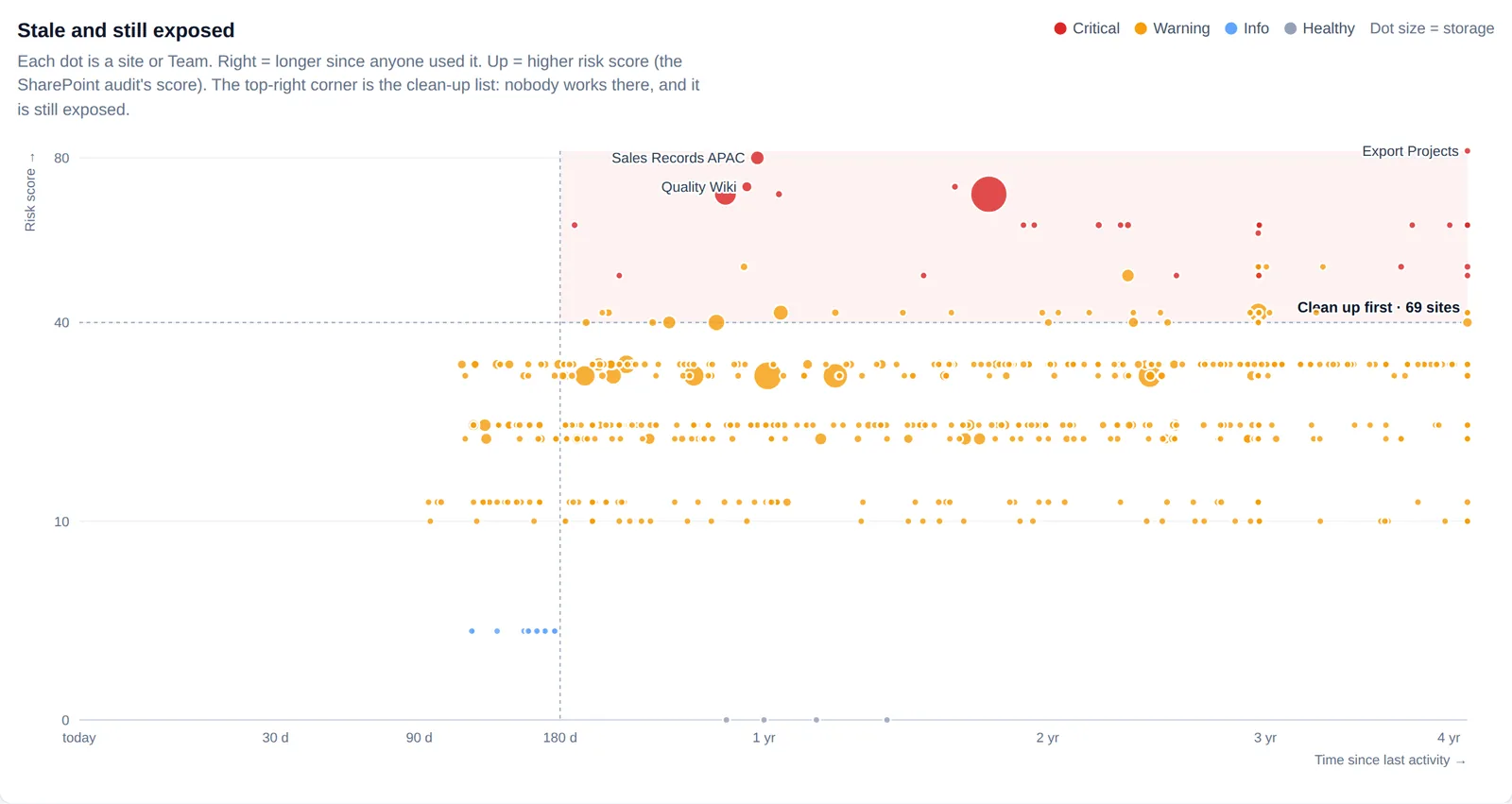
The links a leaver created are not the only ones that outlive their purpose: a folder shared by a colleague who is still here belongs to the same review. A clean-up campaign in Teams asks each owner to close or confirm their own links, which clears the backlog before the next departure (see how to run a sharing clean-up campaign).
FAQ #
Should we block or delete a leaver's account? #
Both, in that order. Blocking stops sign-in but triggers nothing else: the OneDrive, groups and links stay where they are. Deleting starts OneDrive retention and frees the Exchange licence. The exception: if you convert the mailbox to shared or set up forwarding, keep the account, because it anchors them.
How long does the manager have to recover files from the OneDrive? #
The OneDrive retention period: 30 days by default, counted from account deletion. You can raise it to 3,650 days in the SharePoint admin center. A reminder goes out seven days before the deadline, then the OneDrive spends 93 days in the recycle bin, restorable only with PowerShell.
Do a leaver's sharing links still work? #
For their OneDrive, Microsoft only documents that shared content becomes inaccessible once the OneDrive moves to the recycle bin at the end of retention. For files shared from SharePoint sites, the documentation does not say that links are revoked when the creator is deleted. Treat them as live and check them, starting with sensitive folders.
What do we show an ISO 27001 auditor for a leaver? #
A dated list of what the person owned and shared before they left, the same list afterwards, and the record of what was removed in between. That is what answers Annex A controls 5.11, 5.18 and 6.5. A written procedure without those records shows intent, not outcome.
Sources #
- Microsoft Learn, OneDrive retention and deletion: https://learn.microsoft.com/en-us/sharepoint/retention-and-deletion
- Microsoft Learn, Set the OneDrive retention for deleted users: https://learn.microsoft.com/en-us/sharepoint/set-retention
- Microsoft Learn, Manage unlicensed OneDrive accounts: https://learn.microsoft.com/en-us/sharepoint/unlicensed-onedrive-accounts
- Microsoft Learn, Remove a former employee, and steps 1, 4 and 6: https://learn.microsoft.com/en-us/microsoft-365/admin/add-users/remove-former-employee
- Microsoft Learn, Remove licenses from users: https://learn.microsoft.com/en-us/microsoft-365/admin/manage/remove-licenses-from-users
- Microsoft Learn, Restore a deleted user: https://learn.microsoft.com/en-us/entra/fundamentals/users-restore
- Microsoft Learn, user: revokeSignInSessions: https://learn.microsoft.com/en-us/graph/api/user-revokesigninsessions
- Microsoft Learn, Inactive mailboxes: https://learn.microsoft.com/en-us/purview/inactive-mailboxes-in-office-365
- Microsoft Learn, Create and manage inactive mailboxes: https://learn.microsoft.com/en-us/purview/create-and-manage-inactive-mailboxes
- Microsoft Learn, Manage ownerless Microsoft 365 groups and teams: https://learn.microsoft.com/en-us/exchange/troubleshoot/groups-and-distribution-lists/ownerless-group-policy
- Microsoft Learn, How shareable links work in OneDrive and SharePoint: https://learn.microsoft.com/en-us/sharepoint/shareable-links-anyone-specific-people-organization
- Microsoft Learn, B2B collaboration user properties: https://learn.microsoft.com/en-us/entra/external-id/user-properties
- Microsoft Learn, Manage guest access with access reviews: https://learn.microsoft.com/en-us/entra/id-governance/manage-guest-access-with-access-reviews
- Microsoft Learn, Configure how users consent to applications: https://learn.microsoft.com/en-us/entra/identity/enterprise-apps/configure-user-consent
- Microsoft Learn, Review permissions granted to enterprise applications: https://learn.microsoft.com/en-us/entra/identity/enterprise-apps/manage-application-permissions
- ISO/IEC 27001:2022, Annex A, controls 5.11 (return of assets), 5.18 (access rights) and 6.5 (responsibilities after termination or change of employment)
Microsoft documentation checked on 25 September 2026. Retention periods and the rules for unlicensed OneDrive accounts change: check the source page before you freeze a procedure.
Read next #
- Anonymous sharing links in Microsoft 365: find every "anyone" link and fix the risky ones first
- Microsoft 365 storage is full: how to find what is eating your quota
- SMS and voice MFA end on 1 February 2027: find the accounts that will be blocked
One useful Microsoft 365 email a month
New guides, findings from real tenants, and the occasional checklist. No sales sequence, unsubscribe in one click.